Chrome extension · NotebookLM & Gemini Notebook
A NotebookLM Chrome extension for adding sources in bulk
Google publishes no extension of its own, and NotebookLM takes one source at a time: paste, wait, paste again. source-lm is a third-party Chrome extension that puts a playlist, a channel, or a whole JSON export into the open notebook in one click — no account of ours, no server of ours.
Also on Edge Add-ons. $29 once for unlimited bulk actions — no subscription. Source-available and shipped unminified — read the code.
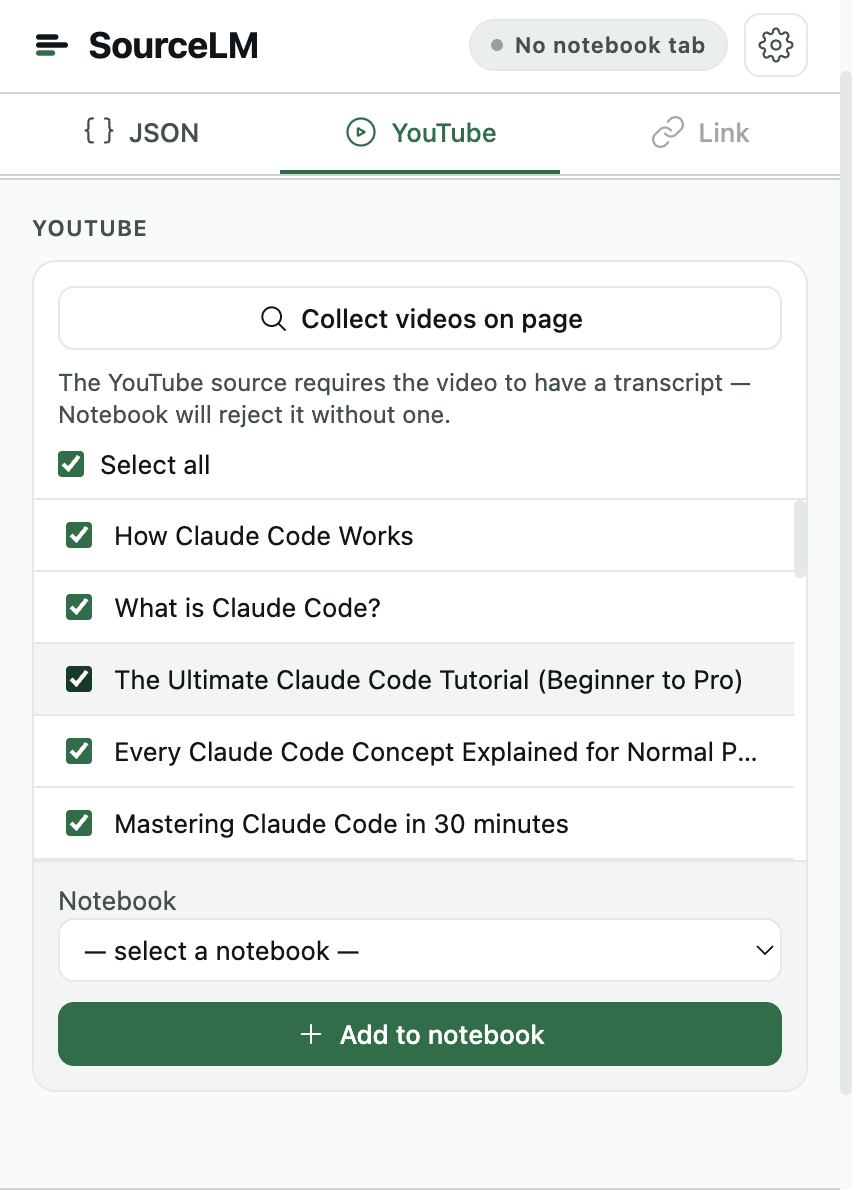
Three inputs, one click each
01
YouTube, from YouTube
“Add to notebook” buttons on the watch page, the playlist panel, the playlist page and the channel header. A playlist goes in with one click, each video its own source; on a channel you set how many of the newest videos to take, 50 by default. The four buttons.
02
A JSON export, split into sources
A Telegram chat export, a ticket dump, any array of records: the popup splits it into Markdown files packed to a word budget under NotebookLM's per-source limit, shows the exact files first, and re-running later uploads only what is new. The Telegram walkthrough.
03
Pages, links and selections
The active tab, a pasted link, or a list of links, one per line; selected text on any page from the right-click menu. A Notion page goes in from a button in Notion’s own top bar, with one level of its subpages if you want them. Nothing is written to disk — the files are built in memory and pushed into the open notebook. Notion, page and subpages.
Start here
What the extension does, and what NotebookLM itself does — grouped by the job you came for.
The extension
- YouTube to NotebookLM in bulk
Every button the extension adds inside YouTube, what NotebookLM keeps from a video, and what counts as one bulk action.
- Telegram export to NotebookLM
JSON from Telegram Desktop or HTML from the macOS app, split into Markdown sources with a cursor so a later export adds only new messages.
- Notion page and subpages to NotebookLM
The button in Notion’s top bar, what it does on your own workspace versus a public notion.site, and how far down the page tree it reaches.
- NotebookLM for studying
The lecture playlist in one notebook, what the source cap means for a 60-lecture course, and questions worth asking a course notebook.
Guides
- NotebookLM MCP + Claude Code: setup and feeding it sources
Set up the NotebookLM (Gemini Notebook) MCP server in Claude Code in three commands, then fill its notebooks from YouTube, Notion and Telegram.
- NotebookLM Web Importer: what it does and what it costs
A checked look at the NotebookLM Web Importer extension — who makes it, its free tier and $19/yr price, what it imports, and where it stops.
- How to use NotebookLM (Gemini Notebook): sources-first guide
How to use NotebookLM (Gemini Notebook): what counts as a source, the ways material gets in, the limits that bite, what to ask, what Studio makes.
- NotebookLM vs Gemini Notebook: same product, renamed in 2026
Gemini Notebook is NotebookLM renamed on July 16, 2026. What changed, what did not, and how it differs from the Gemini chat app — with Google's pages linked.
- Best NotebookLM Chrome extensions in 2026
Google makes no NotebookLM extension. A checked list of third-party Chrome extensions that import, export and organise Gemini Notebook sources, with prices.
- Is NotebookLM private? What Google actually says
What Google states about training, human review, retention and HIPAA for NotebookLM, dated and linked — and what a browser extension adds to that surface.
- NotebookLM limits in 2026: sources, words, size
NotebookLM limits per plan: notebooks, sources per notebook, 500,000 words or 200 MB per source, the 5-hour usage budget with its weekly cap, and Enterprise.
Getting sources in
- How to save a ChatGPT conversation to NotebookLM
Save a ChatGPT conversation to NotebookLM (Gemini Notebook) in one click, as a labelled Markdown transcript. The same for Claude, Gemini and Perplexity.
- How to import Notion pages into NotebookLM, with subpages
NotebookLM has no Notion connector, and a pasted Notion link imports empty. Two ways that work: Notion's own Markdown export, or one click with source-lm.
- Turn a Telegram channel into a NotebookLM knowledge base
Export a Telegram channel in Telegram Desktop and load the archive into NotebookLM as sources — a knowledge base you can question, private channels included.
- Export a Telegram chat to NotebookLM: JSON or HTML
Export Telegram chat history on a Mac (macOS app 12.10+) or in Telegram Desktop — JSON or HTML — and load it all into NotebookLM (Gemini Notebook).
- Add a YouTube channel or playlist to NotebookLM
Add a whole YouTube channel or playlist to NotebookLM in one click — what NotebookLM keeps from a video, a real run, and the limits.
Research & study
- NotebookLM (Gemini Notebook) for teachers: a class notebook
One NotebookLM (Gemini Notebook) notebook per course: lectures, syllabus and readings in, study guide and quiz out of the whole term, re-run next year.
- NotebookLM (Gemini Notebook) use cases for many sources
Seven NotebookLM use cases where the corpus is many items: a lecture playlist, a years-long chat, 200 papers, a ticket export — and how each gets in.
- NotebookLM for a literature review: 200 papers
Export Zotero as CSL JSON, push 200 titles and abstracts into NotebookLM as a handful of sources with source-lm, then add only the PDFs you actually read.
01Does it still work now that NotebookLM is Gemini Notebook?
Yes. Google renamed NotebookLM to Gemini Notebook on July 16, 2026 — same product, same notebooks, new name. The extension works in it, and both names appear on this site because both are still in use. Google's announcement.
02What is free, and what costs money?
Single sources — one page, one link, one video, one selection — are free and unmetered, and so is deleting sources. Bulk actions, meaning one click that adds more than one source, are capped at 5 a calendar month on the free tier and reset on the 1st. $29 once lifts the cap for good; there is no subscription.
03Where do the requests go?
To the notebook's own Google origin, the upload host it hands back, and the payment provider's public licence endpoint — nothing else. There is no author-controlled server, no proxy, no analytics. Settings, the licence key and the free-tier counter live in chrome.storage.sync. What Google says about privacy.
04Does it need an account?
No. There is no sign-up and no sign-in: the extension works inside the Google session you are already signed into, and a paid licence is a key you paste into the popup. Open NotebookLM once after installing so the notebook list is cached — a YouTube page cannot reach the notebook on its own.
05Does it work in Microsoft Edge?
Yes — it is published on Edge Add-ons as well as the Chrome Web Store, and the same build runs in any Chromium browser that takes Manifest V3 extensions. The Edge listing.
One click per archive, not one per source.
Install source-lm5 bulk actions a month, free. Single sources always free.