source-lm

Chrome extension · NotebookLM & Gemini Notebook

Stop addingsourcesone at a time.

A Telegram chat export, a support-ticket dump, any JSON with records — packed into as many Markdown files as it takes, budgeted at 400,000 words under the 500,000-word source cap, never split mid-record. A second run uploads only what is new.

Also available for Microsoft Edge.

No backend; the popup builds the files and sends them to the notebook's own origin, so the Google session never reaches a third-party server. Source-available and shipped unminified — read the code.

0

backend servers

0

runtime dependencies

500,000

words per source

5

free bulk runs a month

Where the manual work goes

One at a time

One run

01

Paste, wait, name it, repeat.

One export in — a Telegram chat, a ticket dump — one run out.

02

Guess what will fit.

A 400,000-word budget measured on the rendered Markdown, frontmatter and headings counted.

03

A record splits across two sources.

A record is never split; an oversized one gets its own file, whole.

04

Re-upload everything and get duplicates.

The cursor is read back from the notebook's own source names, so a second run uploads only what is new.

05

Rejected at the 500,000-word cap.

The budget keeps a deliberate margin under it.

06

Paste links one at a time.

A list of URLs, one per line, in one click — or right-click a selection on any page.

07

A paywalled page fails to fetch and stays broken.

“Broken sources” lists them; open the page, “Add page as .md” swaps the text in.

08

Delete leftover sources one at a time.

Filter, tick the duplicates, batch-delete — three controls in the notebook's Sources panel.

Three steps, no account

01

Pick a source

The JSON file — or a YouTube page, or the current tab.

02

Preview

See the exact files it will create and the word count each one carries.

03

Upload

The files are built in memory and pushed straight into the open notebook — nothing is written to your disk. No account step, because there is no account.

One popup, every input path in.

A record is never split across two files

Files are packed to a 400,000-word budget, measured on the rendered Markdown — frontmatter and headings included — a margin under NotebookLM's 500,000-word cap per source. Run it again on a grown export and only the new records upload; the state is read back from the notebook's own source names, so there is no local watermark to drift out of sync.

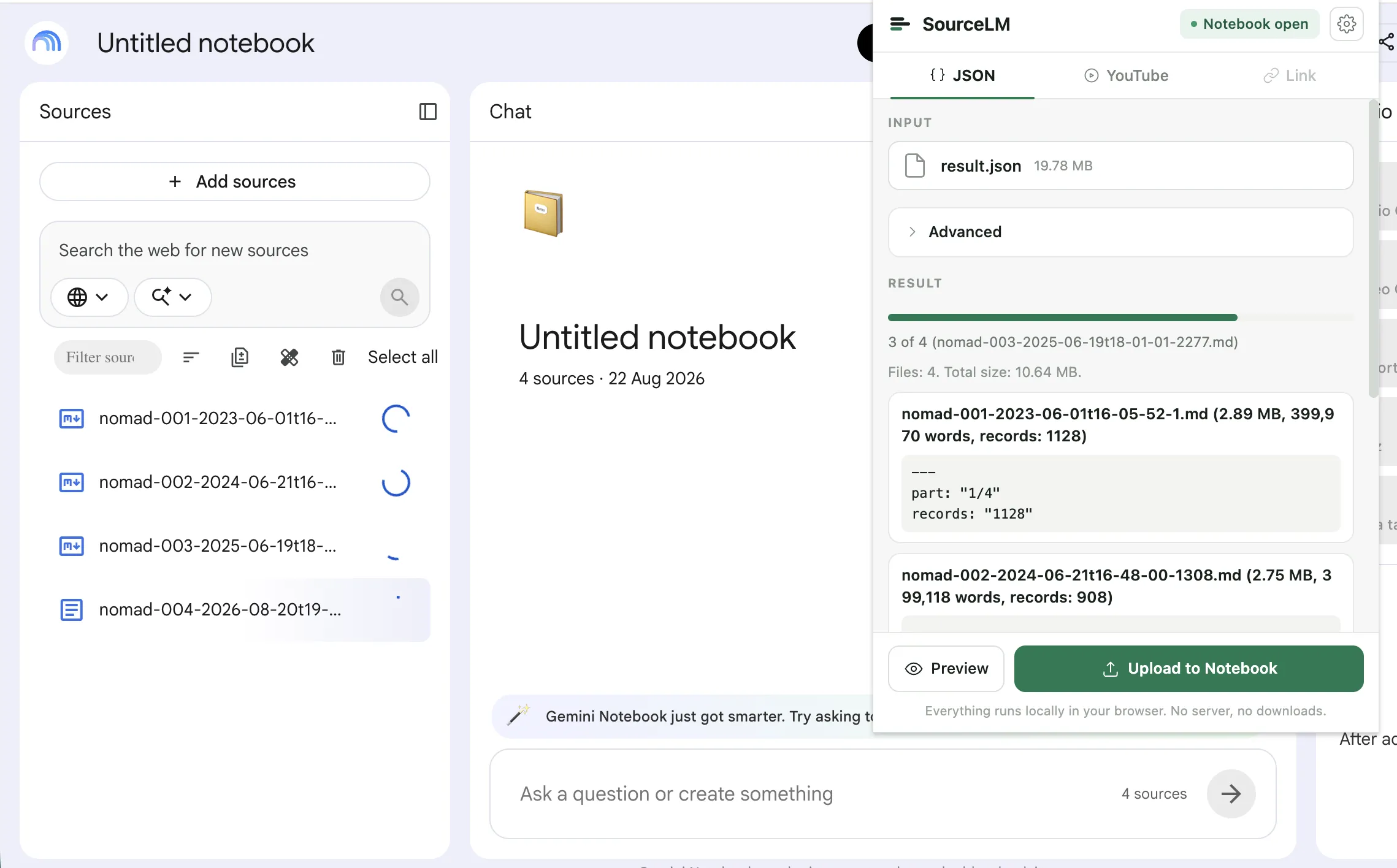
  • nomad-001-2025-01-19t18-42-07-1.md398,412
  • nomad-002-2025-02-23t09-15-51-1340.md217,003
  • nomad-003-2025-03-30t22-03-19-2987.mdkept whole452,918
  • nomad-004-2025-05-04t11-27-44-5611.md184,776
NotebookLM with the nomad-*.md files landing in the Sources panel and the source-lm popup over it mid-upload: 3 of 4, Files: 4, Total size: 10.64 MB.

YouTube, in bulk or in place

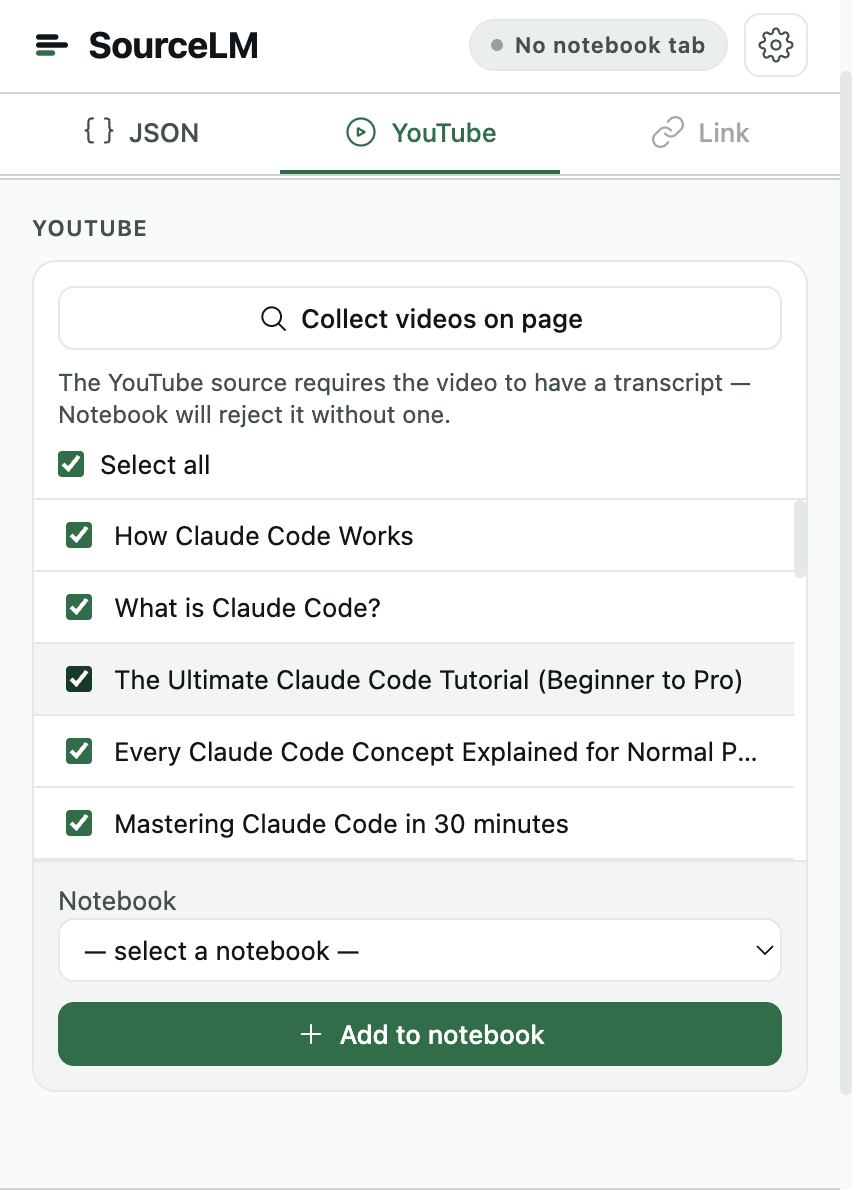
Multi-select videos in the popup, or use the "Add to notebook" buttons injected straight into YouTube's own watch, playlist, and channel pages — including a whole-channel harvest that pulls the latest videos without opening the popup at all. On a watch page, the top comment threads can ride along as a second source. How the YouTube buttons work.

The source-lm popup on its YouTube tab: the videos collected from the page, each with a checkbox and a thumbnail, above a notebook picker and an Add to notebook button.

The tab you're on, any URL, or a list of them

The active tab, a pasted link, or a whole list of links one per line — each goes in as a web source. Highlight text on any page and right-click “Add selection to Notebook” to file just that, straight into a notebook from the submenu.

Filter, find duplicates, delete in one pass

Three controls drop into NotebookLM's own Sources panel: a filter box, a button that ticks the duplicate sources by URL or title, and a batch delete for whatever is checked — instead of the one-at-a-time NotebookLM ships.

Broken source? Replace it with the page text

A “Broken sources” button lists the pages NotebookLM failed to fetch — paywalled, login-walled, JS-rendered. Open the page, click “Add page as .md”, and the captured text takes the broken source's place; the old one is deleted only after the new upload succeeded.

Nothing is written to your disk

Records are packed into Markdown in memory and pushed straight into the open notebook — no export folder, no temp files, nothing to clean up after.

No backend. Check it yourself.

Every claim on this page is something you can go read, not something you have to take on trust.

Requests

The extension talks to three places: the notebook's own origin, the Google upload host it hands back to, and the payment provider's public endpoint for licence checks. Nothing else — no author-controlled server, no proxy, no telemetry, no analytics, no remote code.

read the code

Source

Published unminified and source-available under a noncommercial licence — not open source. What runs in your browser is what is sitting in the repo.

read the code

Licence check

A licence check hits the payment provider's public endpoint with credentials omitted; nothing about your notebooks is transmitted. The one honest exception: settings, the licence key, and the trial counter live in chrome.storage.sync, which Chrome syncs to your own Google account.

read the code

One price, paid once.

No servers behind the extension, no recurring costs to pass on — so the licence is a one-time purchase. Pay once, keep it.

Bulk actions per calendar month — shared across a bulk JSON upload, more than one video picked in the popup, and more than one added from the in-page YouTube dialog
5
Resets
1st of the month
Single sources — one page, one link, one video — and deleting sources
always free

$29one time

Unlimited bulk runs, no recurring charge, no account to manage.

Buy the licence

The key goes into the extension's popup — install it first.

01What does it actually do?

Three inputs: a JSON export — a Telegram chat, for instance — gets split into a batch of Markdown files and uploaded into the open notebook; videos on a YouTube page get added as sources, individually or in bulk; the active tab, a pasted link, or a list of links gets added as web sources, and selected text on any page goes in from the right-click menu. Inside the notebook it adds a filter box, a “select duplicates” button, batch delete, and a “Broken sources” list to the Sources panel.

02Does it take a Telegram chat export?

Yes, in either format. Telegram Desktop exports JSON or HTML; the Telegram for macOS app, since version 12.10, has Export Chat History too, and writes HTML — select all of its messages.html pages at once and the extension orders them itself. The chat name becomes the filename prefix and each message’s date the cursor, so exporting again later uploads only the messages that are new. Text only — photos, voice and stickers stay out. Read the walkthrough.

03What doesn't it do?

No “all open tabs” capture, no Google Drive sync, no schedules or automation, no export out of a notebook. A broken source is not repaired automatically either — the extension lists them, and you open the page and click “Add page as .md” to replace it. Re-running a YouTube import skips videos already in the notebook; it never removes anything. See the YouTube page.

04Why one time and not a subscription?

There is no backend and no recurring cost behind the extension, so there is nothing to bill monthly for — you pay once and keep the licence. It does ride an unpublished Google interface that can change without notice, which is one more reason not to charge you every month for it.

05What happens when the free bulk limit runs out?

5 bulk actions a month is the ceiling on batch uploads and multi-video adds, wherever you trigger them — the popup or the in-page YouTube dialog. Single sources — one page, one link, one video — and deleting sources keep working regardless, and the count resets on the 1st.

06Does Google see anything? Where do requests go?

Requests go to the notebook's own origin, the Google upload host it hands back to, and the payment provider's public endpoint for licence checks — nowhere else. There is no author-controlled server. Settings, the licence key, and the trial counter live in chrome.storage.sync, which Chrome syncs to your own Google account.

07Is this affiliated with Google?

No. NotebookLM and Gemini are Google trademarks; this extension is an independent, unofficial tool that automates clicks in a signed-in Google session.
Get the whole archive in, not one source at a time.

Install source-lm

5 bulk actions a month, free. Single sources always free.

Verified on directreeFeatured on Twelve ToolsSource LM - Featured on Startup FameFazier badge